
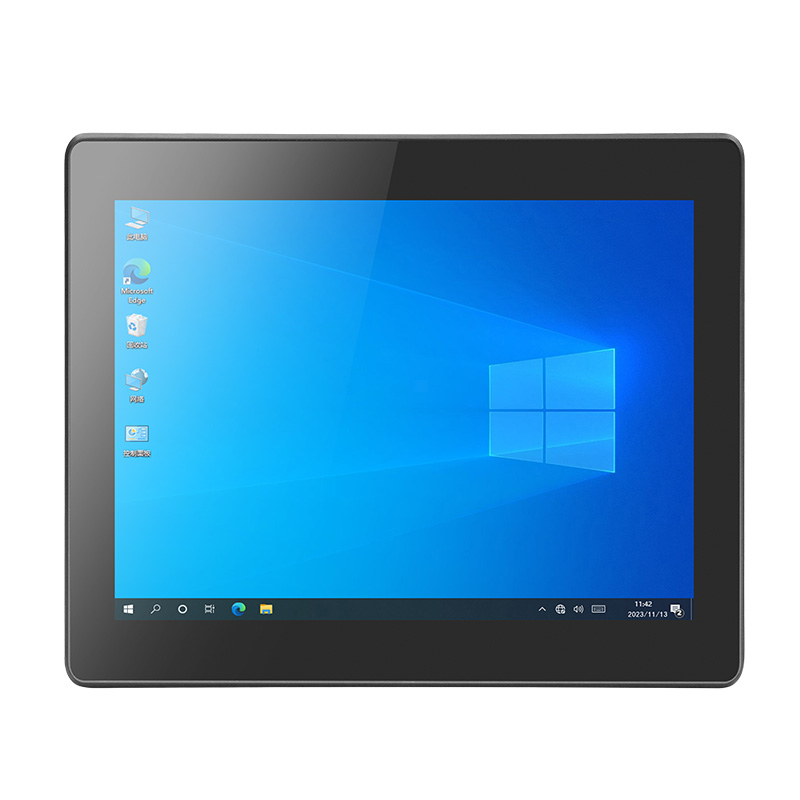
An industrial capacitive panel PC needs to do more than display information. It must provide responsive touch control, stable computing performance, flexible connectivity, and reliable operation in demanding environments. If you are selecting an industrial computer for a production line, logistics warehouse, medical workstation, or building monitoring system, the wrong combination of screen size, interfaces, and power input can complicate installation and increase integration costs.
Geshem’s 17-inch Intel 11th Gen Economy Capacitive Panel PC combines a multi-point capacitive touchscreen with Intel Core i3, i5, or i7 processor options. Its all-metal construction, IP65-rated front panel, and 9–36V DC power input support a range of industrial installations. By reviewing its specifications and application requirements, you can determine whether this industrial capacitive panel PC fits your project and identify the customization options worth discussing with the manufacturer.
Key Features of Geshem’s Capacitive Touch Panel PC
17-Inch Multi-Point Capacitive Touchscreen
The 17-inch industrial display provides a practical interface for equipment control, production monitoring, and data entry. Its multi-point capacitive touchscreen allows operators to interact directly with compatible industrial software without relying exclusively on a keyboard or mouse.
You can consider this display size when your application requires enough screen space for dashboards, equipment status panels, process information, or logistics management interfaces.
Intel 11th Gen Core i3, i5, or i7 Processors
This capacitive touch panel PC offers Intel 11th Gen Core i3, i5, and i7 processor options. The appropriate configuration depends on your software, processing workload, and peripheral requirements.
- Core i3: Consider for basic operator interfaces and routine monitoring tasks, subject to software requirements.
- Core i5: Evaluate for applications involving multiple processes and more demanding control interfaces.
- Core i7: Consider when your application requires additional processing capacity, after verifying compatibility with your software.
Geshem lists one DDR4 memory slot with 8GB installed and support for up to 32GB. Confirm the exact processor, memory configuration, and availability before placing your order.
IP65 Front Panel and All-Metal Construction
Industrial equipment may encounter dust, splashes, oil, and frequent operator contact. This model features an all-metal enclosure and an IP65-rated front panel designed to protect against dust ingress and water jets under the conditions defined by the rating.
However, IP65 protection applies to the specified front panel, not automatically to the entire enclosure. If you plan to install the computer in a washdown area or expose it to chemicals, confirm the complete installation requirements with Geshem.
Flexible Connectivity and Wide-Voltage Input
The listed configuration provides several interfaces for connecting industrial peripherals and communication equipment.
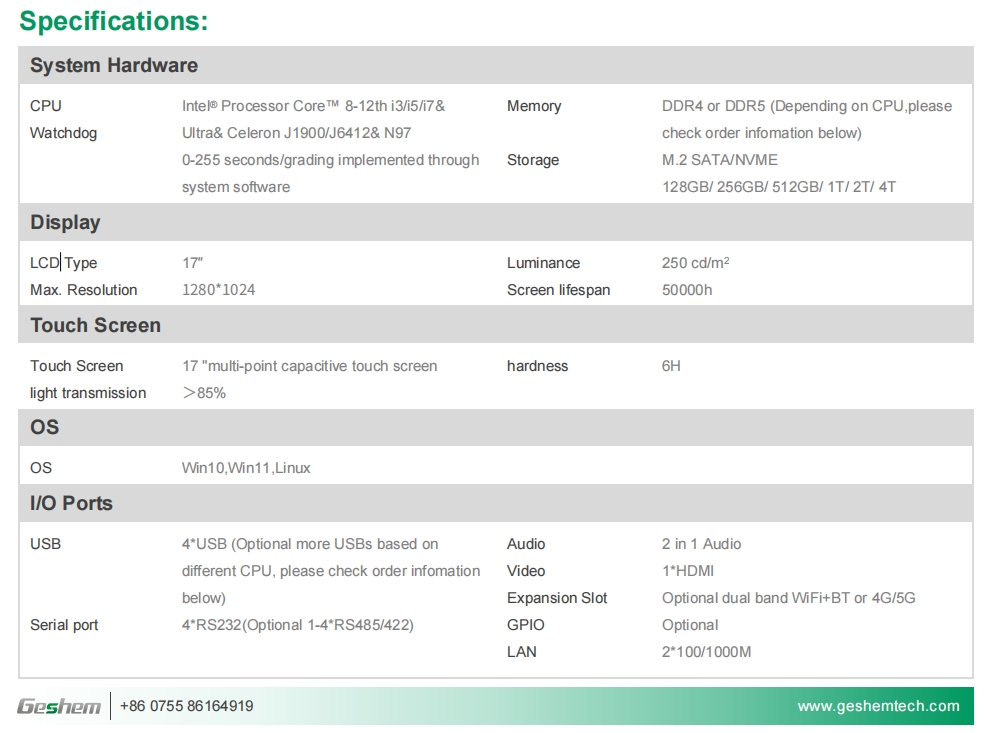
| Specification | Product configuration | Practical consideration |
|---|---|---|
| Display | 17-inch industrial screen | Operator interfaces and monitoring |
| Touch | Multi-point capacitive | Direct screen interaction |
| Processor | Intel 11th Gen Core i3/i5/i7 | Select according to workload |
| Memory | 8GB DDR4, up to 32GB | Verify the final configuration |
| USB | 6 × USB 3.0 | Connect supported peripherals |
| Serial | 4 × RS232 | RS485/RS422 optional |
| Wireless | Optional dual-band Wi-Fi and Bluetooth | Confirm module availability |
| Cellular | Optional 4G | Check network compatibility |
| Power input | 9–36V DC | Verify the actual supply voltage |
| Front panel | IP65 | Assess environmental exposure |
The combination of USB and serial interfaces can simplify integration with barcode scanners, measurement equipment, and compatible industrial devices. Meanwhile, the 9–36V input range offers flexibility for systems with different DC power supplies.
Where Can You Use a 17-Inch Industrial Panel PC?
The right application depends on the software, mounting arrangement, operating environment, and connected equipment.
- Manufacturing and industrial automation: Display production status, machine information, and operator instructions.
- Logistics and warehousing: Support inventory interfaces, warehouse management applications, and compatible scanning peripherals.
- Building monitoring: Present equipment status, alarms, and building management dashboards.
- Medical environments: Serve as a workstation for compatible medical software, subject to the project’s electrical safety, hygiene, and regulatory requirements.
- Transportation systems: Support monitoring and operator interfaces where the installation meets environmental and vibration requirements.
Before choosing a configuration, check the software platform, installation space, peripheral interfaces, and environmental conditions. These factors help determine whether a standard industrial capacitive panel PC meets your needs or requires customization.
How to Select the Right Configuration
Follow these steps to narrow down the specification before requesting a quotation.
- Define the workload. List the operating system, software, and applications you intend to run. Use these requirements to compare the available Core i3, i5, and i7 options.
- Confirm the screen and touch requirements. Check whether a 17-inch display and multi-point capacitive touch meet your interface design and operator workflow.
- Map the required connections. Count your USB and serial devices, then determine whether you need optional RS485, RS422, Wi-Fi, Bluetooth, or 4G.
- Check power and environmental conditions. Verify that your supply falls within 9–36V DC and that the IP65 front panel provides suitable protection for the intended installation.
- Discuss customization with Geshem. Provide your mounting dimensions, interface requirements, preferred configuration, and estimated order quantity so the supplier can assess feasibility.
Industrial Capacitive Panel PC vs. Standard Industrial Display
An industrial display and a panel PC serve different functions. Understanding the distinction helps you avoid purchasing additional computing hardware unnecessarily.
| Comparison | Industrial capacitive panel PC | Industrial display |
|---|---|---|
| Computing hardware | Integrated processor and memory | Usually requires an external computer |
| Touch operation | Available on this model | Depends on the display configuration |
| System integration | Combines computing and display functions | Primarily provides visual output |
| Typical use | Operator interfaces and local applications | External PC display and monitoring |
| Key selection factor | Processing, interfaces, and software compatibility | Display specifications and video connectivity |
Choose a panel PC when you want computing and display functions in one unit. An industrial display may be more appropriate when your project already has a separate computer and only needs a screen.
FAQ
1. Does this industrial capacitive panel PC support Windows?
The supplied product specifications do not identify a confirmed operating system. Contact Geshem to verify supported Windows or Linux versions, drivers, and software compatibility before ordering.
2. Is the entire panel PC waterproof to IP65?
The product specifies an IP65-rated front panel. This does not establish an IP65 rating for the complete enclosure, so confirm the protection level of the full assembly for your installation.
3. Can Geshem customize the 17-inch capacitive touch panel PC?
Geshem offers OEM/ODM and customization services. You can discuss processor selection, memory capacity, communication modules, serial interfaces, and project-specific integration requirements. Confirm technical feasibility, minimum order quantities, and lead times directly with the company.
Conclusion
Geshem 17-inch model combines a multi-point touchscreen, Intel 11th Gen Core processor options, 8GB DDR4 memory with support for up to 32GB, multiple industrial interfaces, and a 9–36V DC input. Its IP65-rated front panel and all-metal construction make it worth evaluating for suitable manufacturing, logistics, building monitoring, and other industrial applications.
If you are sourcing an industrial capacitive panel PC, compare the required computing performance, interface configuration, power supply, and environmental protection before making your decision. A specification review can help you identify the right configuration and avoid unnecessary integration work.
Request a Configuration Review from Geshem
Contact Geshem at marketing@geshem.cn or call +86 18362970867. Share your application, preferred processor, operating system, interface requirements, and installation conditions to discuss a suitable configuration and request a quotation.